Blog /
Project Notebook: my WebMCP Challenge build
Why I built a visual notebook for people and AI agents, how its three WebMCP tools work, and what I learned testing it.
Adapted from my About section for the WebMCP Challenge. This is the account of the challenge build and its testing at the time.
Try Project Notebook · View the source
Why I built this
I use ChatGPT Voice a lot, but the useful work usually ends up trapped in a chat that I forget about. I wanted to talk through an idea and have the agent build the actual notebook in front of me, with pages I can inspect, revisit, and correct.
Project Notebook is a visual notebook that people and AI agents can work in together.
This is a new build. I had tried to make the idea work with earlier MCP tools, but that version was a dead end. It never became a usable product and never made it to a public Git repository. The agent could produce an answer, but it could not reliably work against the page I was looking at and leave behind a useful artifact.
WebMCP allowed me to execute the original idea. The page can publish a small, typed contract that the notebook itself owns. An agent can create and revise actual pages, while I can see the result, move through it, and undo a change when I need to. That lets agents help me study, sketch ideas, and trace homework pages into interactable notebooks.
The anatomy notebook I wish I had in college
The clearest example is Anatomy Exam Prep. When I took anatomy and physiology in college, studying for lab practicals was difficult because I did not have a skeleton model at home. I was looking at textbook diagrams and trying to memorize every bone in the human body. I also used a physical anatomy coloring book, which helped connect names and locations to the act of studying.
I built the notebook I wish I had then. Its first page contains an interactive 3D adult skeleton with 206 logical bones and 208 source meshes. Models can use WebMCP to open the notebook and exact page. Once there, the anatomy lesson provides accessible controls for selecting and isolating a bone, orbiting and zooming the model, switching camera presets, and bringing the full skeleton back.
The notebook also has Test mode. It gives me answer fields for a section, lets me move through the questions, scores the answers, and saves the latest result so I can try again.
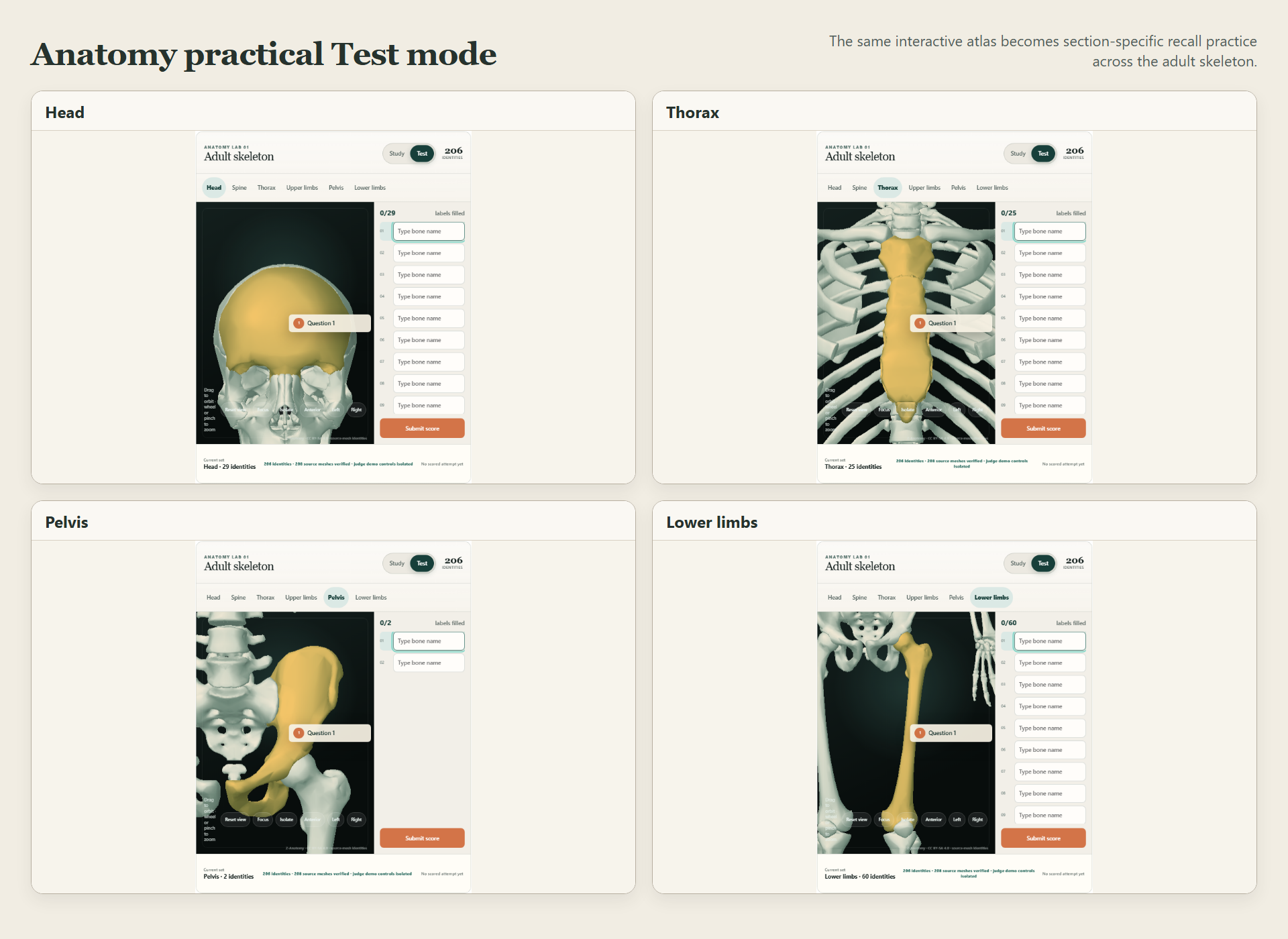
Fresh captures from the published site. Each panel shows the selected body section, the highlighted structure, and the answer fields used for practical-exam recall.
The next six pages are 3D coloring labs for the head, spine, thorax, upper limbs, pelvis, and lower limbs. I can choose a color, paint a bone surface, erase a mark, clear a bone or section, and switch from visible labels to recall prompts. It recreates the part of my physical coloring book that helped me study, but ties it to the same explorable skeleton.
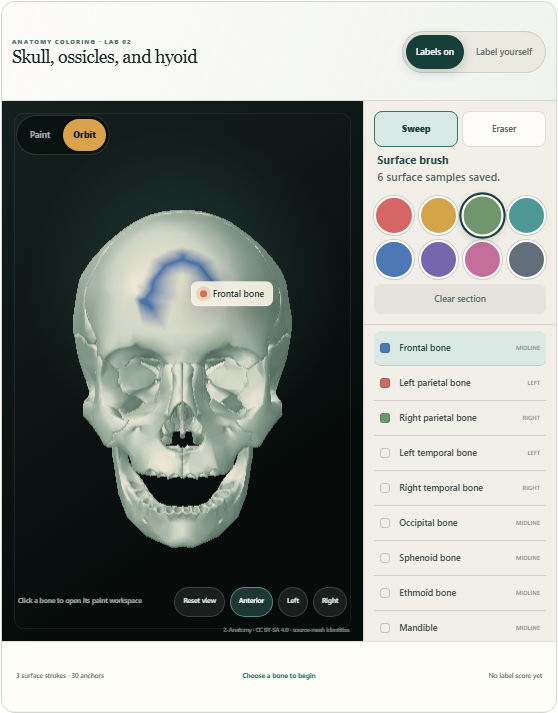
Fresh capture from the published site. The skull lab shows saved paint on the 3D model, the active palette, three started bones, the surface brush, and the bone index.
The current challenge demo uses WebMCP to open the exact notebook and page. Bone selection, model orbit, zoom, Test mode, and coloring on the anatomy pages are direct accessible browser interactions. I keep that distinction visible because I want the demo to say exactly what the agent did.
What a WebMCP tool is
WebMCP lets a web page publish named, typed capabilities to an AI client. Instead of hunting for buttons or manipulating the page’s HTML, the agent asks the application for an outcome. The application validates the request, changes the notebook through its real data model, and returns a structured receipt.
Project Notebook deliberately exposes only three tools:
notebook_read   Inspect notebook context without scraping the interface.
notebook_open   Move directly to the intended notebook, page, or view.
notebook_apply  Create and revise notebook content through validated actions.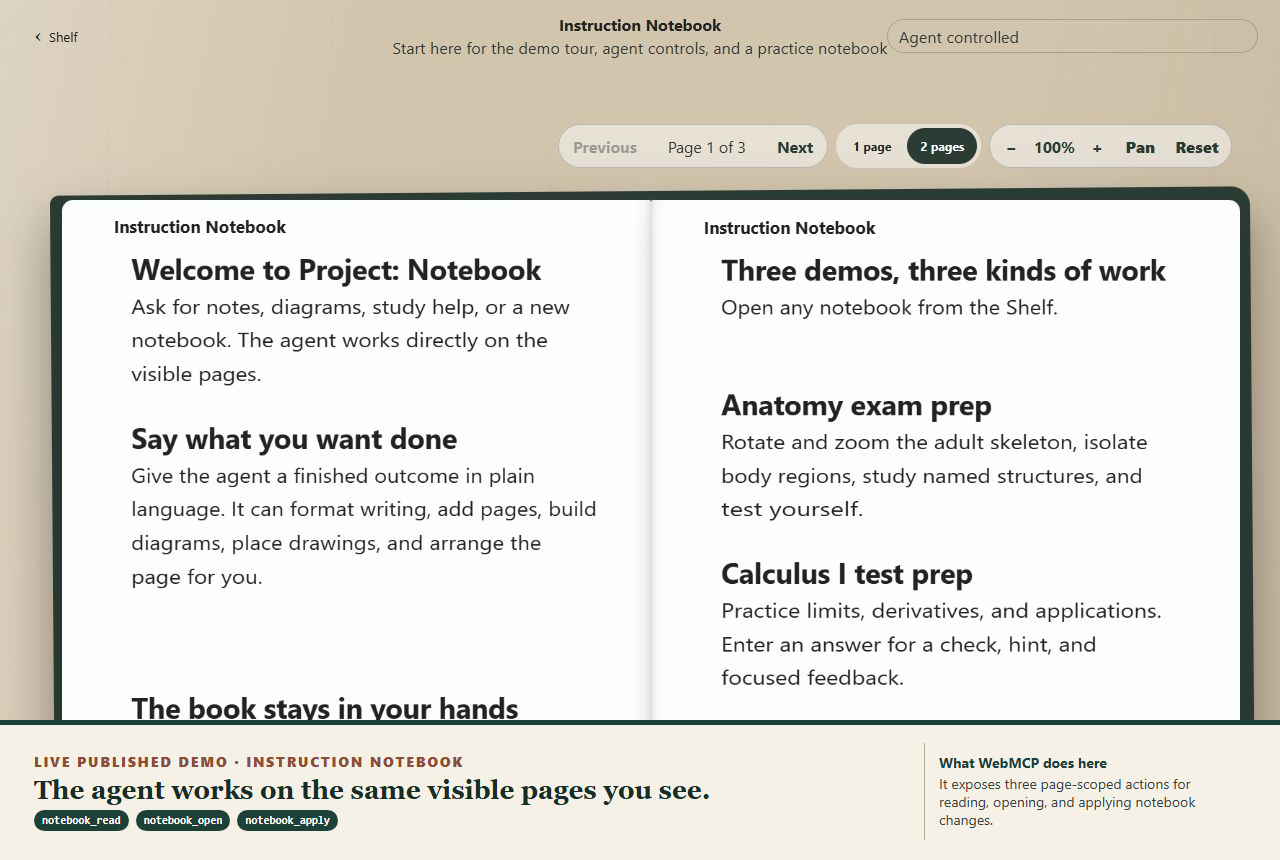
Fresh capture from the published site. The annotation names the three tools exposed by the current build and summarizes what each one does.
notebook_read
This is the read path. It can return the agent guide, notebook shelf, current notebook, one exact page, or recent action receipts. The result contains structured text and figure information, page numbers, and stable references for later actions. It does not expose raw editor state or make the agent reverse-engineer the DOM.
notebook_open
This is the navigation path. It can open the shelf, open a notebook by title or id, open an exact page, move to the previous or next page, or reset the notebook view. Exact-page navigation matters. An agent can move from page 1 to page 7 directly instead of pretending to click Next six times.
In my own testing, a navigation task that took roughly 90 seconds dropped to roughly 10 seconds after I tightened the agent instructions and removed unnecessary back-and-forth. That is an observation from my use of the app, not a controlled benchmark.
notebook_apply
This is the main workhorse. One typed action can:
- Create a notebook
- Write formatted headings, paragraphs, quotes, bullets, or numbered steps
- Add a semantic diagram or bounded editable drawing
- Trace validated vector ink
- Arrange a page element or a group of diagram nodes
- Add a page when the notebook needs more room
- Undo the latest agent change exactly
The application computes identifiers, placement, pagination, and layout. It validates the content and geometry before saving. It rejects raw HTML, CSS, JavaScript, arbitrary URLs, raw SVG, and renderer-specific records. Every accepted change returns a receipt, and agent mutations participate in the notebook’s real history.
A trace test: from a reference page to editable notebook ink
One test used a visible Encyclopaedia Britannica reference page as the source. I asked the agent to bring the useful diagram into a notebook instead of leaving the work in a chat or pasting in a flat screenshot.
The agent’s trace workflow converted the visible source into a bounded VectorInkDocument. It removed material outside the selected region, kept the traced paths within strict size and command limits, and passed the typed document to notebook_apply as a figure.trace action. Project Notebook validated the geometry, placed the result on the page, saved it in the notebook’s real history, and returned a receipt. The traced figure could then be moved, resized, and undone like other notebook content.
WebMCP did not scrape Britannica or perform the image-to-vector conversion. The agent prepared the safe vector document, and the page accepted and placed it through its published tool contract. That boundary is important because the notebook stays responsible for what enters its document.
Three tools instead of dozens
My first approach exposed too much of the notebook’s machinery. A deployed-style audit saw four tools on the shelf and 31 after the Instruction Notebook opened. Source inspection found anatomy paths that could expose as many as 40. The agent had to choose among narrow commands, track page state, and do work the application should have owned.
The current build exposes exactly three stable tools. I think of that as the practical V1-to-V2 change: fewer public verbs, while the notebook does more of the work.
Person speaks or types a request
              ↓
Agent reads only the context it needs
              ↓
Agent opens the exact target
              ↓
Agent applies a typed notebook action
              ↓
Notebook validates, commits, renders, and returns a receipt
How I built it
Project Notebook is built with React and TypeScript. The application registers the three tools through document.modelContext.registerTool(...). Zod validates every tool request before the notebook changes. The saved page document remains the authority for content, layout, revisions, and exact Undo.
The public judge demo is session-scoped and uses same-origin requests, so judge activity stays temporary in the browser session. ChatGPT Voice is the conversational input path. The application does not embed an OpenAI API key, microphone stack, Realtime route, or WebRTC client.
How agents tested their own work
I did not record myself manually authoring the finished notebook. I gave agents bounded test briefs and asked them to operate the current application through its registered callbacks. A fixed local harness recorded the notebook, the tool activity, and the evidence needed for review.
The technical workflow looked like this:
I write a bounded test brief
              ↓
Agent opens the real notebook page
              ↓
document.modelContext exposes the three registered callbacks
              ↓
Agent calls notebook_read, notebook_open, and notebook_apply
              ↓
The notebook validates and commits each operation
              ↓
A fixed recorder captures the page and an evidence rail
              ↓
Agent returns video, screenshots, receipts, and an error sidecar
              ↓
I accept or reject the run against visible checkpoints
The evidence rail made the agent’s work inspectable. It showed the initiating request, the exact tool in use, the app’s returned success message, and whether any trusted manual input occurred. The recordings kept WebMCP calls separate from direct browser interactions.
The accepted local agent-authorship run created a four-page field-study notebook with formatted notes, a semantic cycle diagram, an editable drawing, a study guide, direct page opens, and exact Undo. Its sidecar reports 16 successful WebMCP calls: one notebook_read, eleven notebook_apply, and four notebook_open. It recorded zero trusted notebook clicks, typing, dragging, scrolling, or pointer events, and no page, console, or request errors.
That is local acceptance evidence against the real registered callbacks. It is not a claim that the recording came from the final public ChatGPT client. Public HTTPS testing in the supported client remains a separate submission check.
How I used Codex
I used OpenAI Codex as an engineering collaborator throughout the build. Codex helped me compare interaction designs, implement the React and TypeScript paths, reduce the WebMCP surface to three tools, build browser acceptance tests, inspect the rendered notebook, and trace failures back to the tool contract or page layout.
Agents also acted as test operators. I assigned a scenario, asked them to use the site, and had them return recordings, screenshots, receipts, event counts, and failures. Some runs were rejected because the page count, duration, or final framing missed the stated checkpoint. That rejection trail was useful. It showed me when the app worked technically but the demonstration still failed to make the work clear.
What I learned
The biggest lesson was that more tools do not make an agent more capable. A small set of outcome-level tools worked better than dozens of page-specific controls. The application should own ids, validation, placement, pagination, and recovery. The agent should describe the notebook result it needs.
I also learned to tell the agent to move directly. Repeated reads and small navigation steps add a surprising amount of time. Clear instructions, exact page opens, and a complete notebook_apply action cut down the back-and-forth.
A successful callback is only part of the job. The notebook still has to be understandable while it changes. Page framing, receipts, visible tool evidence, screenshot review, and exact Undo became part of the product contract.
What comes next
The next step is better onboarding for an agent arriving on the page for the first time. notebook_read can already return a guide, but I want the first interaction to teach the useful verbs and limits through a short, concrete example.
I also want ordinary requests to take fewer round trips. A complete request should create a notebook and its first useful page in one call. Direct opens should replace repeated page advancement. A single apply request should add a coherent figure while the application handles placement.
From there, I want to add more page-native learning activities and reusable notebook templates without expanding the public tool surface again.